← Back to home
Free · Takes about a minute

How to get your free Gemini API key

My AI.S.S runs on your own personal Gemini API key, so your documents go straight from your computer to Google — never through our servers. Here's how to grab one, no coding required.

  1. 1

    Open Google AI Studio

    Go to aistudio.google.com/apikey — this is Google's own page for creating API keys, so it's completely free and official.
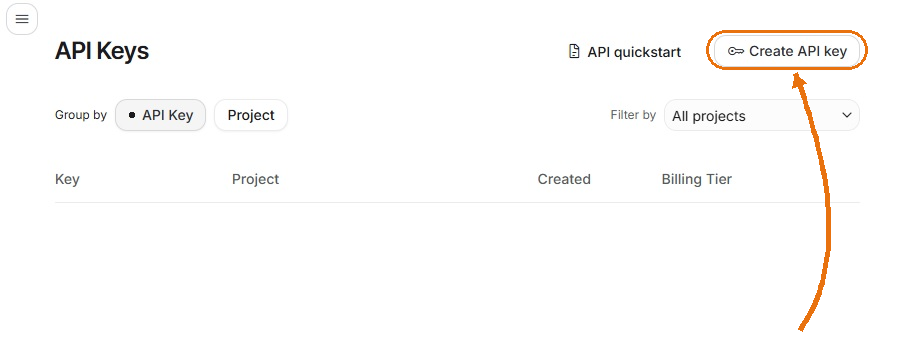
    Google AI Studio API Keys page with an arrow pointing to the Create API key button in the top right
    Click the image to zoom in
  2. 2

    Sign in with your Google account

    Any Gmail or Google account works — the same one you'd use for Google Docs or YouTube. No new sign-up needed.

  3. 3

    Click "Create API key"

    If it's your first time, Google usually sets up a default project for you automatically — you can leave everything as-is and just continue.

    Seeing "Unable to create API key"? This happens to some accounts even when you're signed in correctly — it's a known Google-side hiccup, not something you did wrong. The fix is to create the project yourself first:

    1. Go to console.cloud.google.com/projectcreate (same Google account).
    2. Give the project any name — e.g. "My AISS" — leave the rest as default, and click Create. Wait a few seconds.
    3. ⚠️ Refresh the AI Studio tab — this step is important! Go back to the AI Studio API Keys page and reload it (F5). If you skip this, AI Studio still shows the old page and "Import project" will say your project can't be found, even though it was created successfully.
    4. After refreshing, click Import project, select the project you just created, and import it.
    5. Click Create API key again and choose that imported project — it should work now.
  4. 4

    Copy the key

    Your key will be a long string starting with AIzaSy… Click to copy it — you'll paste it in one place only, so there's nothing else to set up.

  5. 5

    Paste it into My AI.S.S

    Open the app, go to Settings → Gemini API Key, paste it in, and save. That's it — you're ready to start summarizing.

Good to know

  • It's genuinely free. Google's free tier is generous enough for normal day-to-day summarizing. You'll only need to enable billing if you're processing very high volumes.
  • It's private. This key belongs only to you. My AI.S.S uses it to talk to Google directly from your computer — we don't have a server, and we never see your documents.
  • Keep it to yourself. Treat your key like a password — don't share it or post it publicly (including in screenshots). If you're ever unsure whether it's been exposed, delete it in AI Studio and create a new one in seconds.
Optional, but recommended · Also takes about a minute

How to get your free Groq API key

Gemini is the main engine, but Groq automatically steps in as backup if Gemini is ever slow or briefly unavailable — so your summary still comes through without interruption. Setting this up is optional but recommended, and just as quick.

  1. 1

    Open Groq Console

    Go to console.groq.com/keys — Groq's own page for creating API keys.

  2. 2

    Sign in

    You can sign in with Google, GitHub, or your email — whichever is easiest. No credit card is required for the free tier.

  3. 3

    Click "Create API Key"

    Give it any name — e.g. "My AISS" — and click Submit.

  4. 4

    Copy the key

    Your key will be a long string starting with gsk_… Groq only shows it once, so copy it right away.

  5. 5

    Paste it into My AI.S.S

    Open the app, go to Settings → Groq API Key, paste it in, and save. Gemini stays your main engine — Groq only kicks in automatically if it's ever needed.

Good to know

  • It's genuinely free. Groq's free tier is generous enough to cover backup use for normal day-to-day summarizing.
  • It's not a "weaker" backup. Groq runs Llama 3.3 70B on custom chips built for speed — it's just as capable as Gemini, only faster.
  • Keep it to yourself. Treat this key like a password too — don't share it or post it publicly. You can delete and recreate it anytime in Groq Console.
Download My AI.S.S for Windows — Free

Already downloaded it? Just paste your key(s) into Settings and you're set.